Canvas webhooks
Trigger screenshot pipelines with a URL list and receive signed gallery notifications with image download links.
Start with the Canvas workflow guide to create and connect blocks in the dashboard.
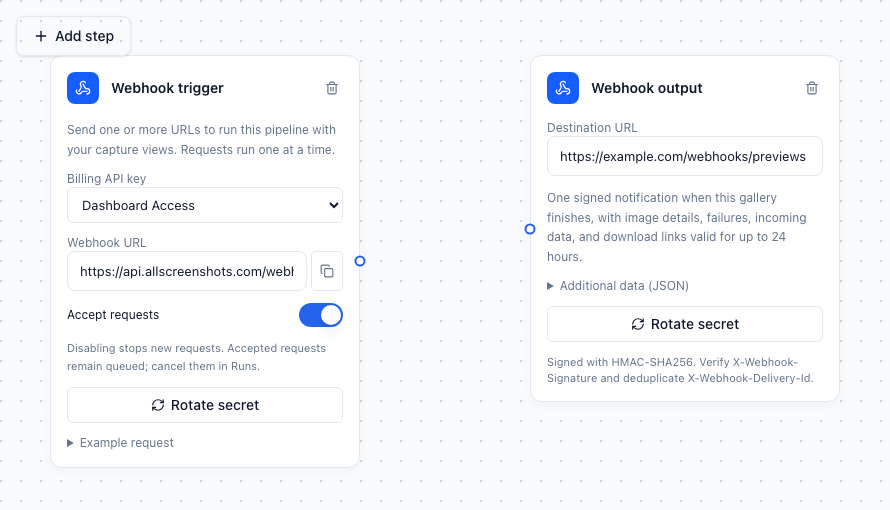
Example input and output configuration. Connect the trigger to Screenshot, and Gallery to the output; the full chain is described below.
Use an incoming webhook to supply website URLs to a saved pipeline. Connect the trigger to Screenshot, configure Capture views, add any image edits, save results to Gallery, and connect Gallery to Webhook output to notify your service.
Webhook trigger + Capture views → Screenshot → Resize → Watermark → Gallery → Webhook outputConfigure the blocks
- Add the two webhook blocks and connect them as above. Set the output's destination URL and optional additional JSON data, then save the pipeline.
- Click Create signing secret on the output. Store the secret in your receiving service; it is only returned once. Secrets are never saved in the graph. Rotating it affects future accepted runs; existing runs retain their snapshotted destination and signing secret.
- Choose the trigger's billing API key and click Enable webhook. Copy its endpoint and trigger secret. This is a dedicated credential, separate from the billing API key. You can disable the trigger or rotate its secret later.
- Open Example request to copy a curl command. Test webhook queues a request from the dashboard without having to provide the trigger secret.
Webhook pipelines cannot use schedules. Pause an existing schedule before adding and enabling the trigger. One trigger can coexist with static URL sources; static URLs are captured on every request too. A pipeline supports one incoming trigger.
Example: submit two URLs
curl -X POST 'https://api.allscreenshots.com/webhooks/canvas/PIPELINE_ID/NODE_ID' \
  -H 'Authorization: Bearer YOUR_TRIGGER_SECRET' \
  -H 'Content-Type: application/json' \
  -H 'Idempotency-Key: order-123-preview-v1' \
  --data '{"urls":["https://example.com","https://example.org"],"data":{"orderId":"123"}}'
An accepted request returns HTTP 202:
{"id":"RUN_ID","runId":"RUN_ID","status":"QUEUED"}The body accepts 1–1,000 URLs, with at most 256 KiB for the whole request and
32 KiB for the optional JSON data object. Each URL uses the capture views and
options saved when the request was accepted. Existing capture-count, capability,
URL safety and credit limits also apply. The billing key and credits are checked
again before starting. A request that cannot start fails visibly in Runs, without
creating captures, and its output webhook receives failure details.
Requests run FIFO, one active run per pipeline. Limits are 100 pending requests per pipeline, 1,000 per organization, and 60 accepted requests per trigger per minute. Full queues and rate limits return HTTP 429. Cancel a pending request in Runs. Disabling a trigger stops new requests; it does not cancel accepted requests. Deleted or expired billing keys prevent queued work from starting.
An optional Idempotency-Key of 1–200 characters deduplicates requests for seven
days. Repeating a key with the same URL list and data returns the original run;
using it with different input returns HTTP 409. Use a new key for each
intentional execution. Graph edits do not alter previously accepted requests.
Output notification
A webhook output sends one logical event per run when its connected gallery finishes, including partial and failed results. It sends the gallery's edited images when edits are connected, not replacement originals. An output can also be added to an ordinary manually run or scheduled pipeline.
{
  "event":"PIPELINE_GALLERY_COMPLETED",
  "timestamp":"2026-10-16T09:00:00Z",
  "deliveryId":"759960d3-1ab0-4795-9e85-aecdd167731d",
  "data":{
    "pipelineId":"PIPELINE_ID",
    "runId":"RUN_ID",
    "galleryNodeId":"GALLERY_NODE_ID",
    "status":"COMPLETED",
    "runStatus":"RUNNING",
    "total":1,"completed":1,"failed":0,
    "imageCounts":{"total":1,"completed":1,"failed":0},
    "error":null,
    "inputData":{"orderId":"123"},
    "customData":{"project":"website-previews"},
    "images":[{
      "id":123,"jobId":"JOB_ID","url":"https://example.com",
      "view":"Desktop","edited":true,"width":1200,"height":675,
      "format":"png","status":"COMPLETED","error":null,
      "downloadUrl":"https://api.allscreenshots.com/webhooks/canvas/download/TOKEN",
      "expiresAt":"2026-10-17T09:00:00Z"
    }],
    "hasMore":false,
    "resultsUrl":"https://api.allscreenshots.com/webhooks/canvas/results/TOKEN",
    "expiresAt":"2026-10-17T09:00:00Z"
  }
}
status describes this gallery, while runStatus is the pipeline's state at
notification creation. The run can still be running while delivery or another
branch finishes. total, completed, and failed count the run's captures;
imageCounts describes this gallery, including edited images. Failed image
records have error details and no download URL.
Up to 100 records are included inline. Fetch resultsUrl for the complete
paginated gallery: its response contains items and nextCursor; pass that
cursor as ?cursor=... until it is null. The first page starts from zero.
Links work without another login for up to 24 hours. Image links expire sooner if capture retention ends. Deletion or expiration makes an image unavailable immediately. Treat these links as credentials and keep them out of logs. Signing and trigger secrets are independent; keep both out of client-side code.
Example: verify and acknowledge a notification
Requests include X-Webhook-Event, X-Webhook-Delivery-Id,
X-Webhook-Timestamp, and X-Webhook-Signature. Verify the HMAC of the raw
request bytes before parsing or acting on the body:
import { createHmac, timingSafeEqual } from 'node:crypto';

export function validSignature(rawBody, signature, secret) {
  const expected = 'sha256=' + createHmac('sha256', secret)
    .update(rawBody).digest('hex');
  const supplied = Buffer.from(signature ?? '');
  const wanted = Buffer.from(expected);
  return supplied.length === wanted.length && timingSafeEqual(supplied, wanted);
}
Deduplicate the signed body's deliveryId (also provided in the delivery header).
Return HTTP 2xx after accepting the event. Delivery is at least once, so a retry
can arrive even when an earlier attempt was processed successfully. Retries use
the same delivery ID and exact payload. The timestamp header identifies each
attempt; the signed body timestamp identifies event creation.
Delivery makes five total attempts for network errors, HTTP 429, and HTTP 5xx, with 1, 2, 4, and 8-second delays between attempts. Requests have a 30-second network timeout. Other non-2xx responses fail immediately. Pending deliveries and leases survive restarts. Exhausted delivery failures appear on the output node and make an otherwise successful run partial, preserving successful gallery images. Queued delivery lines remain idle; animation starts only during an actual attempt, after the connected gallery finishes.
For direct email delivery or uploads into your own bucket, use Email delivery and S3 / R2 upload. Webhook outputs remain available for custom integrations.
Response codes
| HTTP status | Meaning |
|---|---|
202 | Accepted and queued, or the existing run for a matching idempotent request |
400 | Invalid JSON, URL list, or data object |
401 | Missing or invalid trigger credentials |
409 | An idempotency key was reused with different input |
413 | Request body exceeds the size limit |
429 | Trigger rate limit or queue capacity reached |
Treat 202 as acceptance, not completion. Use the output notification and Runs to find out whether capture, editing, and delivery succeeded.
Example: store previews in your own bucket
- Connect Webhook trigger + Capture views → Screenshot → Resize → Gallery → Webhook output.
- Submit URLs with an internal record identifier in
data, such as{"customerId":"123"}. - Verify and deduplicate the output event, then acknowledge it with 2xx after durably queuing your own work.
- Download successful images before their links expire. If
hasMoreis true, paginateresultsUrlto retrieve the full list. - Upload the files to your S3 or R2 bucket using your application's storage credentials, and associate them with
inputData.customerId.
Keep destination URLs reachable from Allscreenshots servers. Private or unsafe network destinations are rejected. You do not need to expose a receiving endpoint for manual gallery-only workflows.
Related: image editing and watermark variables, Canvas scheduling.